Your visitors · 4 min read
Set up Plan a visit
Plan a visit answers first-time questions (how long the service runs, where kids go, where to park), lets a guest pick a Sunday, adds it to their calendar and emails them a reminder the day before.
Open Plan a visitSigns you in to your website’s dashboard and opens this screen.
- On the left, click Next step button, then Plan a visit.
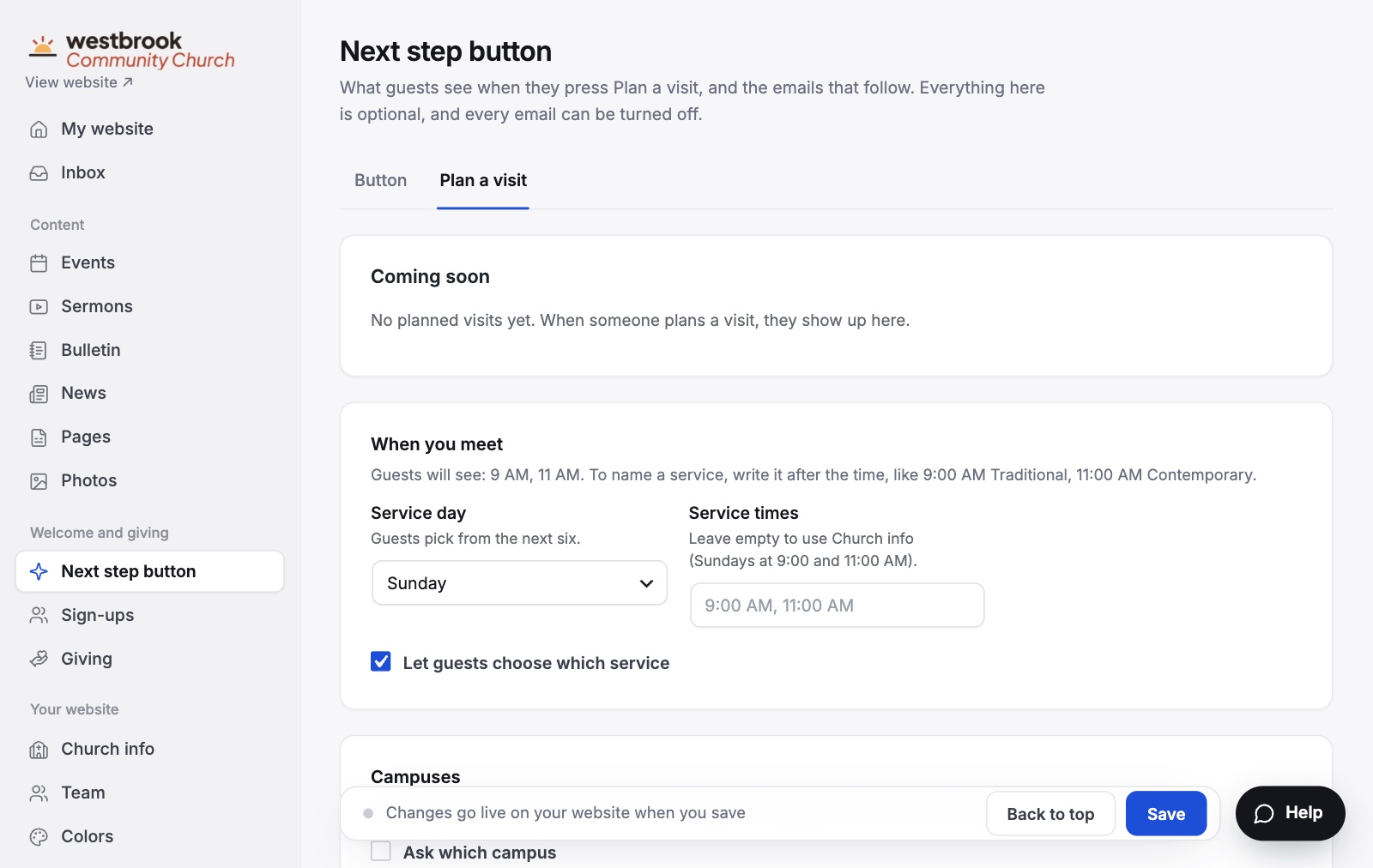
- Under When you meet, set your service day and times, so guests can pick a real Sunday and time.
- Fill in What to expect: a few short answers about kids, parking, what to wear and how long the service runs.
- Under Emails to guests, read the confirmation, the day-before reminder and the follow-up. Change the words if you like, or turn any of them off.
- Use Send a sample to to see the emails in your own inbox, then click Save.
Good to know
- Each visit plan shows up in your Inbox, so someone can watch for the guest on Sunday.
- If a guest cannot make it, the email has a link to tell you. Their reminders stop on their own.
Still stuck?
Ask in the chat and get an answer right away. If it needs a person, the team takes it from there.
Chat with usor email hello@sundayfront.com